
I met these tools on an industrial project, sitting next to operators who used them every day. The complaints were consistent: interfaces that felt stuck in the past, too many clicks for ordinary jobs, no access beyond the machine, and eight to twelve minutes of setup before a single mark was made. That became the brief.
CLIENT
CLIENT
Confidential, presented as Novamark
Confidential, presented as Novamark
INDUSTRY
INDUSTRY
Industrial software, laser marking, jewellery
Industrial software, laser marking, jewellery
ROLE
ROLE
Solo UX and UI designer
Solo UX and UI designer
TOOLS
TOOLS
TOOLS
Figma, Field Interviews, Rapid Prototyping, Affinity Design
Figma, Field Interviews, Rapid Prototyping, Affinity Design
YEAR
YEAR
YEAR
2024
2024
THE PROBLEM
THE PROBLEM
NOBODY CHOSE IT
NOBODY CHOSE IT
NOBODY CHOSE IT
NOBODY CAN LEAVE
NOBODY CAN LEAVE
NOBODY CAN LEAVE
Laser marking software arrives with the machine. Changing the software usually means changing the machine too.
Laser marking software arrives with the machine. Changing the software usually means changing the machine too.
Laser marking hardware arrives with its control software already installed, and buying different hardware is the only real way to change what you look at every day.
EZ CAD and SCAPS cover most of the installed base. Forty one percent of the operators I spoke to had tried an alternative and then gone back. Not because the alternative was necessarily worse, but because the switching cost was high and the familiar tool was already part of the machine.
Setup for an ordinary job took eight to twelve minutes before the laser fired. Operators had learned to accept that time as part of the process.
Laser marking hardware arrives with its control software already installed, and buying different hardware is the only real way to change what you look at every day.
EZ CAD and SCAPS cover most of the installed base. Forty one percent of the operators I spoke to had tried an alternative and then gone back. Not because the alternative was necessarily worse, but because the switching cost was high and the familiar tool was already part of the machine.
Setup for an ordinary job took eight to twelve minutes before the laser fired. Operators had learned to accept that time as part of the process.

EZ CAD Interface is overwhelmeing, actions are spreaded all around and new users (but also seniors) find it hard to understand where to click to find what they need.
EZ CAD Interface is overwhelmeing, actions are spreaded all around and new users (but also seniors) find it hard to understand where to click to find what they need.
EZ CAD Interface is overwhelmeing, actions are spreaded all around and new users (but also seniors) find it hard to understand where to click to find what they need.
WHAT USERS SAID
WHAT USERS SAID
Eight years on the same software. Still searching for basic functions.
Eight years on the same software. Still searching for basic functions.
The vast majority of operators I spoke with rated their current software poor or very poor to use. Almost everyone kept handwritten notes at the workstation, including reminders for tasks they ran every week and still couldn't reliably recall.
One jeweller had been using EZ CAD for eight years and was still looking up how to do ordinary things.
The interesting part wasn't that people disliked the software. They had adapted to it so thoroughly that many treated the friction as their own shortcoming rather than something the software could solve.
The vast majority of operators I spoke with rated their current software poor or very poor to use. Almost everyone kept handwritten notes at the workstation, including reminders for tasks they ran every week and still couldn't reliably recall.
One jeweller had been using EZ CAD for eight years and was still looking up how to do ordinary things.
The interesting part wasn't that people disliked the software. They had adapted to it so thoroughly that many treated the friction as their own shortcoming rather than something the software could solve.

THE DECISION
THE DECISION
Built around the job. Not around the machine.
Built around the job. Not around the machine.
The old tools are organised around the way the software is architected. I structured NovaMark around the way an operator describes the job:
Pick what you are marking.
Place it on the piece.
Set the laser.
Run.
That sequence became three fixed panels, arranged left to right. The structure stays consistent so operators always know where they are.
I also deliberately chose not to rebuild the vector editor. Operators who need advanced drawing tools already have them. Recreating Illustrator inside the laser software would have added weight without solving the main problem.
The old tools are organised around the way the software is architected. I structured NovaMark around the way an operator describes the job:
Pick what you are marking.
Place it on the piece.
Set the laser.
Run.
That sequence became three fixed panels, arranged left to right. The structure stays consistent so operators always know where they are.
I also deliberately chose not to rebuild the vector editor. Operators who need advanced drawing tools already have them. Recreating Illustrator inside the laser software would have added weight without solving the main problem.

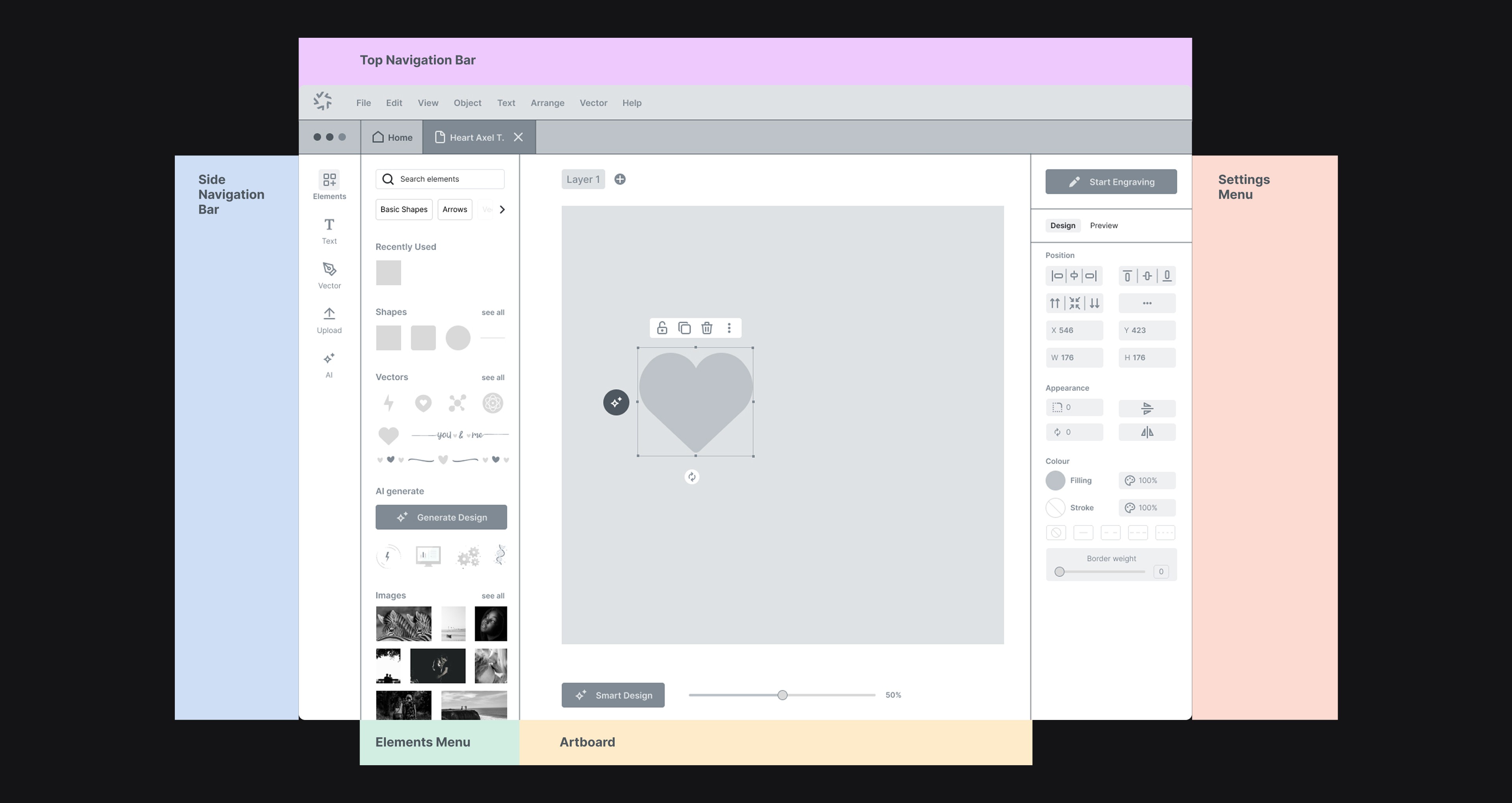
Every version where I let the panels adapt to context tested worse. People stopped knowing where they were. Fixed and slightly rigid beat clever here.

THE SYSTEM
THE SYSTEM
THREE PANELS
THREE PANELS
THREE PANELS
LEFT TO RIGHT
LEFT TO RIGHT
LEFT TO RIGHT
Three features, each one traceable to a specific complaint.
Three features, each one traceable to a specific complaint.
The final system is built around three main capabilities.
Material intelligence replaces manual power, speed and frequency entry with a visual library of tested material profiles. Operators can still override the values when needed, but they don't have to start from numbers every time.
The design assistant turns a text description into laser-ready vectors for operators who need simple artwork without opening Illustrator. The generator was constrained around the physical limits of the machine: closed paths only, no gradients and a minimum stroke of 0.15mm.
The template library organises reusable artwork around actual use cases such as jewellery, industrial marking, signage and gifts.
The system also extends beyond the workshop monitor. Full tablet and mobile support lets operators check a running job away from the machine, including from the front of the shop.
The final system is built around three main capabilities.
Material intelligence replaces manual power, speed and frequency entry with a visual library of tested material profiles. Operators can still override the values when needed, but they don't have to start from numbers every time.
The design assistant turns a text description into laser-ready vectors for operators who need simple artwork without opening Illustrator. The generator was constrained around the physical limits of the machine: closed paths only, no gradients and a minimum stroke of 0.15mm.
The template library organises reusable artwork around actual use cases such as jewellery, industrial marking, signage and gifts.
The system also extends beyond the workshop monitor. Full tablet and mobile support lets operators check a running job away from the machine, including from the front of the shop.


The features weren't added because they sounded useful. Each one came from a specific complaint I heard during the research.
THE BUILD
THE BUILD
One system. Workshop monitor down to a phone.
One system. Workshop monitor down to a phone.
The product was designed as one responsive system rather than separate desktop and mobile experiences.
Underneath the interface is a complete design system covering type scale, spacing, components and interaction states. Every pattern was documented so the same logic could carry from a large workshop monitor to a phone held in a gloved hand.
The final deliverable was an interactive Figma prototype supported by a concept video for internal review. That prototype made it possible to test the workflow before development.
The product was designed as one responsive system rather than separate desktop and mobile experiences.
Underneath the interface is a complete design system covering type scale, spacing, components and interaction states. Every pattern was documented so the same logic could carry from a large workshop monitor to a phone held in a gloved hand.
The final deliverable was an interactive Figma prototype supported by a concept video for internal review. That prototype made it possible to test the workflow before development.


THE OUTCOME
THE OUTCOME
Setup halved. Nobody asked "where do I find?".
Setup halved. Nobody asked "where do I find?".
On the same task, average setup time dropped from 9.2 minutes with EZ CAD to 3.8 minutes with the NovaMark prototype.
The ease-of-use score moved from 4.2 to 8.7 out of ten. Eleven of twelve participants completed the tested tasks without assistance, and 70% said they would replace EZ CAD or SCAPS as their main software.
The time saving is the number people notice first. The result I care about more is quieter: during the sessions, nobody asked where to find the functions they were looking for.
That happened because the interface followed the order people already thought in, rather than the order the machine happened to be wired in.
On the same task, average setup time dropped from 9.2 minutes with EZ CAD to 3.8 minutes with the NovaMark prototype.
The ease-of-use score moved from 4.2 to 8.7 out of ten. Eleven of twelve participants completed the tested tasks without assistance, and 70% said they would replace EZ CAD or SCAPS as their main software.
The time saving is the number people notice first. The result I care about more is quieter: during the sessions, nobody asked where to find the functions they were looking for.
That happened because the interface followed the order people already thought in, rather than the order the machine happened to be wired in.
9.2 → 3.8 min
9.2 → 3.8 min
Average task completion against EZ CAD
Average task completion against EZ CAD
4.2 → 8.7
4.2 → 8.7
Ease of use score, out of ten
Ease of use score, out of ten
11 of 12
11 of 12
Tasks completed without assistance
Tasks completed without assistance
70%
70%
Operators who replace EZ CAD / SCAPS as main software
Operators who replace EZ CAD / SCAPS as main software
These are prototype validation results, not production usage data. NovaMark was delivered as a working prototype and design system, so the figures describe the design as tested rather than a product in daily production.
These are prototype validation results, not production usage data. NovaMark was delivered as a working prototype and design system, so the figures describe the design as tested rather than a product in daily production.
Let's chat on WhatsApp

Marko
Hi, How can I help you? :)
MENU
Home
Home
Home
Home
CONTACT
markoferrari@proton.me
GET IN TOUCH
MENU
Home
Home
Home
Home
CONTACT
markoferrari@proton.me
GET IN TOUCH